Welcome pack for trades
How to join the Hopecraft pilot in Warwickshire, and what happens next.
Welcome
Get your evenings back. Your customer turns up knowing what they want. That is the whole idea, and this pack shows you how to join the Warwickshire pilot in about ten minutes.
You know the call: "roughly how much for an extension?" No sizes, no budget, no idea whether the council will allow it, and you drive out to find out. With Hopecraft the homeowner does that part first: they type their postcode, see their own house in 3D, draw the extension on it, and see a rough cost range and what the council may want checked.
What reaches you is a short brief you can price from: the sizes, which wall it goes on, the roof, the cost range they have already seen, and the planning points still to check. It comes to you alone, as a PDF on WhatsApp or email. There is no portal to keep checking.
How it works during the pilot
Each brief goes to one trade, not to a list. During the pilot we choose that trade ourselves, by hand, from the firms we have met and checked.
- A homeowner types their postcode, and their own house appears in 3D at its measured size.
- They draw the extension (or the solar panels) on it, and see a rough cost range and the planning points.
- When they want a quote, the design becomes a brief.
- We send the brief to one trade who covers that work and that area, as a PDF on WhatsApp or email.
- You price it, visit if you need to, and tell us how it went.
Where things stand today: nobody has been sent a real brief yet. The first trades to join will be the first to get one, and your honest view of it is the most useful thing you can give us.
Getting set up: five steps, about ten minutes
You need your phone and your business details. Nothing is paid for and nothing is downloaded.
1. Open the trade page
Type hopecraft.onrender.com/supplier into your phone's browser, exactly like that. Putting "www." in front of it won't work.
2. Create your trade account
Fill in your business (or your own name), choose a username (one word with no spaces, like abuilder) and a password of at least 8 characters, then press Create account. The email is optional.
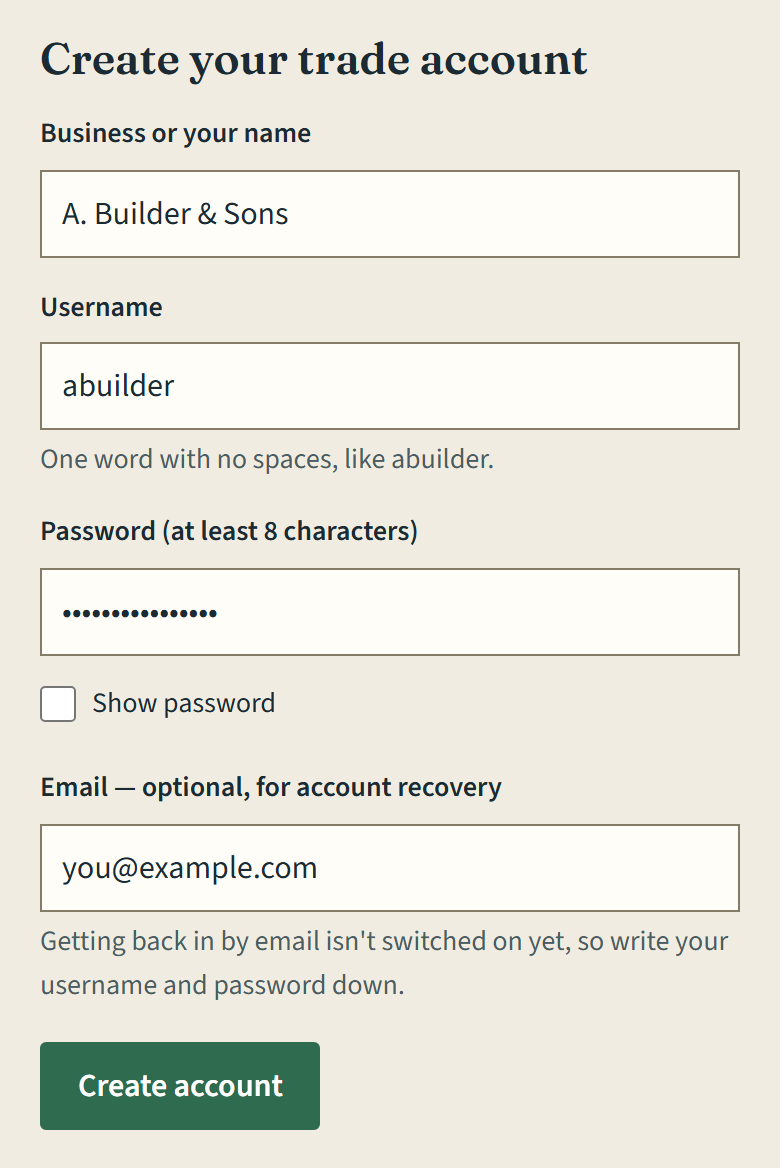
- Write your username and password down. Getting back in by email isn't switched on yet, so if you lose them, email us.
- If you already made a homeowner account on Hopecraft, make a separate trade account here. A homeowner account won't sign in on this page.
3. Tick what you offer
Tick every service you genuinely cover. An unticked box means you never get that kind of work, and a firm that does several things ticks several.
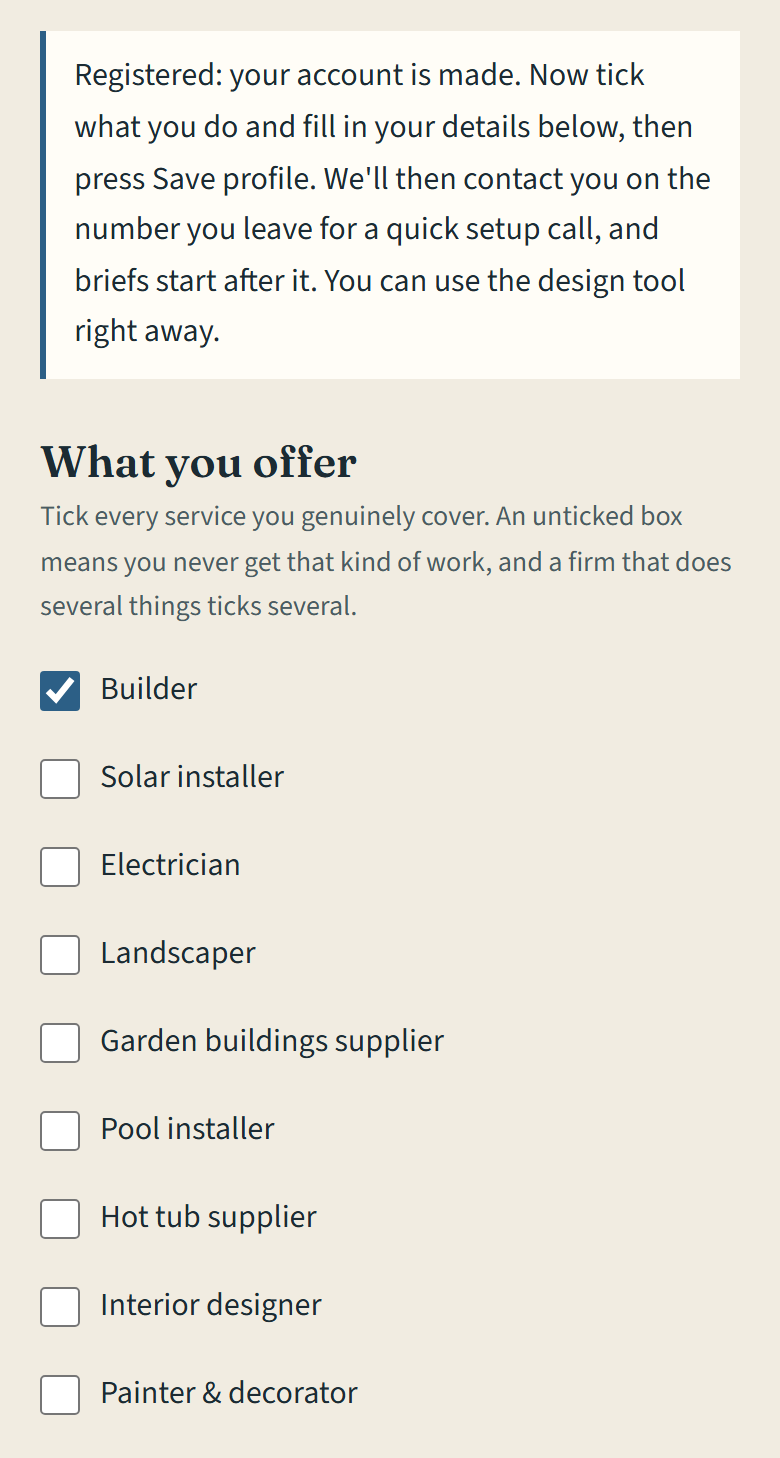
| If you do… | Tick |
|---|---|
| Extensions | Builder |
| Solar panels and batteries | Solar installer |
| Car chargers | Electrician |
There are other boxes further down the list. Tick one only if you really do that work.
4. Add your details and save
Fill in the boxes under the list, then press Save profile. You'll see Saved. underneath.
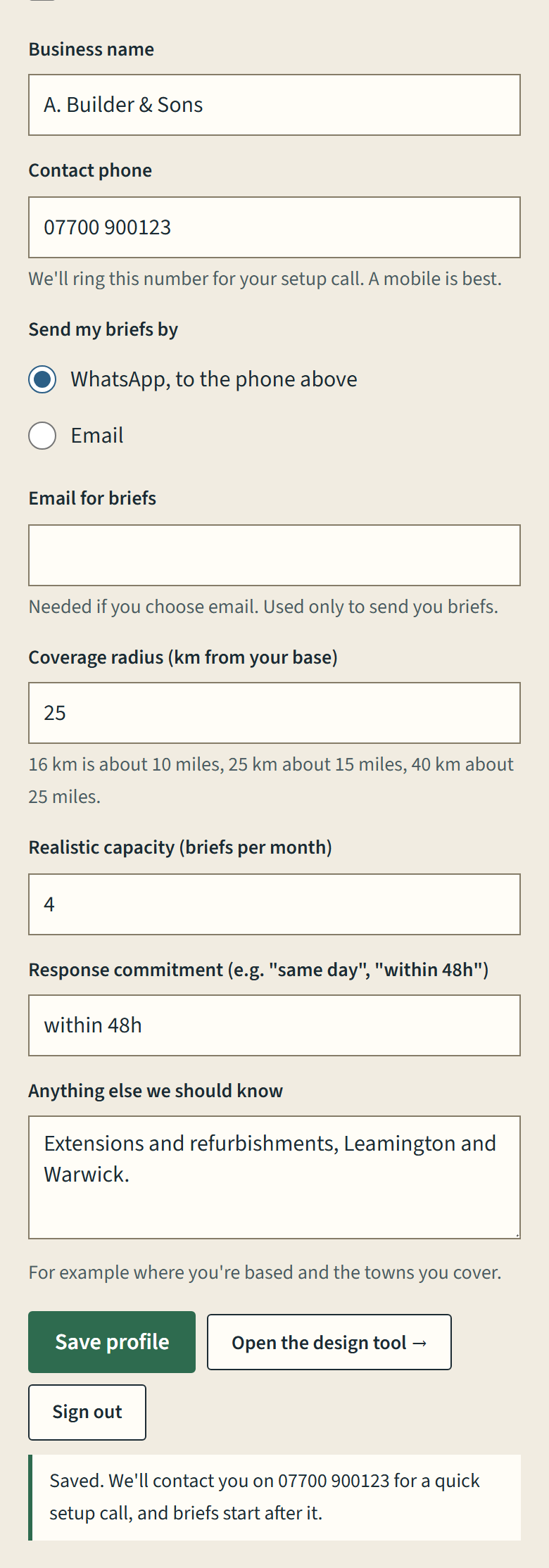
- Contact phone: the number we'll ring for your setup call. A mobile is best.
- Send my briefs by: WhatsApp or email, whichever suits you. If you choose email, add the address under Email for briefs.
- Coverage radius: in kilometres from your base. 16 km is about 10 miles, 25 km about 15 miles, 40 km about 25 miles.
- Realistic capacity: how many briefs a month you could actually look at properly.
- Response commitment: how quickly you'll reply to a brief, in your own words, for example "within 48h".
5. Try it on a real job
Press Open the design tool →, type the postcode of a job you're pricing this week, and draw the extension on it. That is exactly what your customers will see.
The line at the top of your profile then reads Registered. It changes to Vetted after your setup call (next section), and briefs can come to you from then on. To sign back in later, use the same page: Already registered? → Sign in.
Your setup call
Once you have saved your profile, we'll contact you on the number you left for a quick conversation. Briefs start after it, because the whole thing falls apart if a homeowner is sent someone who doesn't turn up.
Have these ready:
- Your public liability insurance certificate. We ask to see it, even if we know you well.
- How long you've traded under this name, and your Companies House number if you're a limited company.
- Your trade body or certification: FMB or similar for builders, MCS for solar installers, Part P for electricians.
- Photos of two or three past jobs, and one past customer who's happy to be asked "would you use them again?"
- The area you really cover, as a distance or a list of towns.
On the call we'll agree two things:
- How fast you'll reply to a brief, as a number ("same day", "within 48 hours"), not "quickly".
- Telling us what happened to each brief: whether you quoted, and whether you won the job. That is the one thing we ask in return for the pilot being free, and it's how we find out whether any of this works.
When a brief arrives
A brief is a few pages about one job, made by the homeowner on their own house. You can see a shortened example on the For trades page.
What's in it
- The house's size, and the extension's: width, depth, wall height and height to the top.
- Which wall it goes on, which way that faces, and the roof style.
- The doors, windows and rooflights they chose, and the finishes they'd like.
- "Who quotes what": the work split by the trade that prices it.
- The planning points, each with its reason.
- The rough cost range they've already seen, and their budget and timing if they gave them.
- The picture may show the winter shadow on next door, if they looked at it. Ask them about it: it's worth raising in week one.
What it isn't
- Not a quote. The cost range is from published 2026 guides; yours is the number that counts.
- Not a measured survey. Footprints and wall heights usually come from Ordnance Survey, and the roof shape may be assumed, so check it on your visit.
- Not legal advice. Planning points are rules of thumb for England, and the plot line is not a legal boundary.
How to reply
- Reply to whoever sent it, within the time you agreed: a quote, a question, or a no.
- A quick no is fine. Tell us why, because that shapes the next brief.
- Ask us anything you need from the homeowner. We pass questions on and do the chasing.
- Afterwards, tell us whether you quoted and whether you won it.
Using it with your own customers
You don't have to wait for a brief from us. The tool works the other way round too, and the customer stays yours: using it with your own client sends them nowhere else.
- On a "how much, roughly?" call: send them to hopecraft.onrender.com. They type their postcode, draw the job, and press Send to a builder › on the last step. It reaches you on WhatsApp or email as a link to their exact design. They can also press Save a PDF and send you the file themselves.
- At the kitchen table: open it on a tablet and scope the job together. Move the extension, change the size, and watch the cost range move with it.
- For a customer who isn't sure: send a guided tour instead of a pitch, either an extension, and the kitchen opened up behind it, on a semi in Leamington Spa or solar on a house in Southam. Each one walks them through with a single green button.
Straight answers
What does it cost? Free during the pilot. What comes after hasn't been decided, and nothing will be charged without being agreed with you first.
Will other firms get the same brief? No. Each brief goes to one trade. The honest flip side: if another firm we've checked covers the same work and area, some briefs go to them, so you won't see every job in your trade.
Do I have to take every brief? No. A quick no with a reason is fine, and it helps.
Is there anything to sign? Not to start. The site's terms of use are at hopecraft.onrender.com/terms.
What happens to my details? They are used to check you and to send you work, nothing else, and never for a marketing list. Your password is stored only in a scrambled form we can't read. More at hopecraft.onrender.com/privacy.
Can I leave? Yes, at any time and at no cost. Email us and we'll remove your account and your details.
Ready to go
- Trade account made at hopecraft.onrender.com/supplier
- Every service you cover ticked
- Phone, how you want briefs, area, capacity and reply time saved
- Tried the tool on one real job
- Insurance certificate and trade body details to hand
- Setup call done, and your profile reads Vetted
Questions at any point: email Michael Hope at hopecraftuk@gmail.com, or message whoever introduced you.